Managing Automation Agents
Easily manage your automation agents—edit drafts, copy agents, schedule runs, re-run for fresher data, and collaborate with your team.
1. Editing Drafts
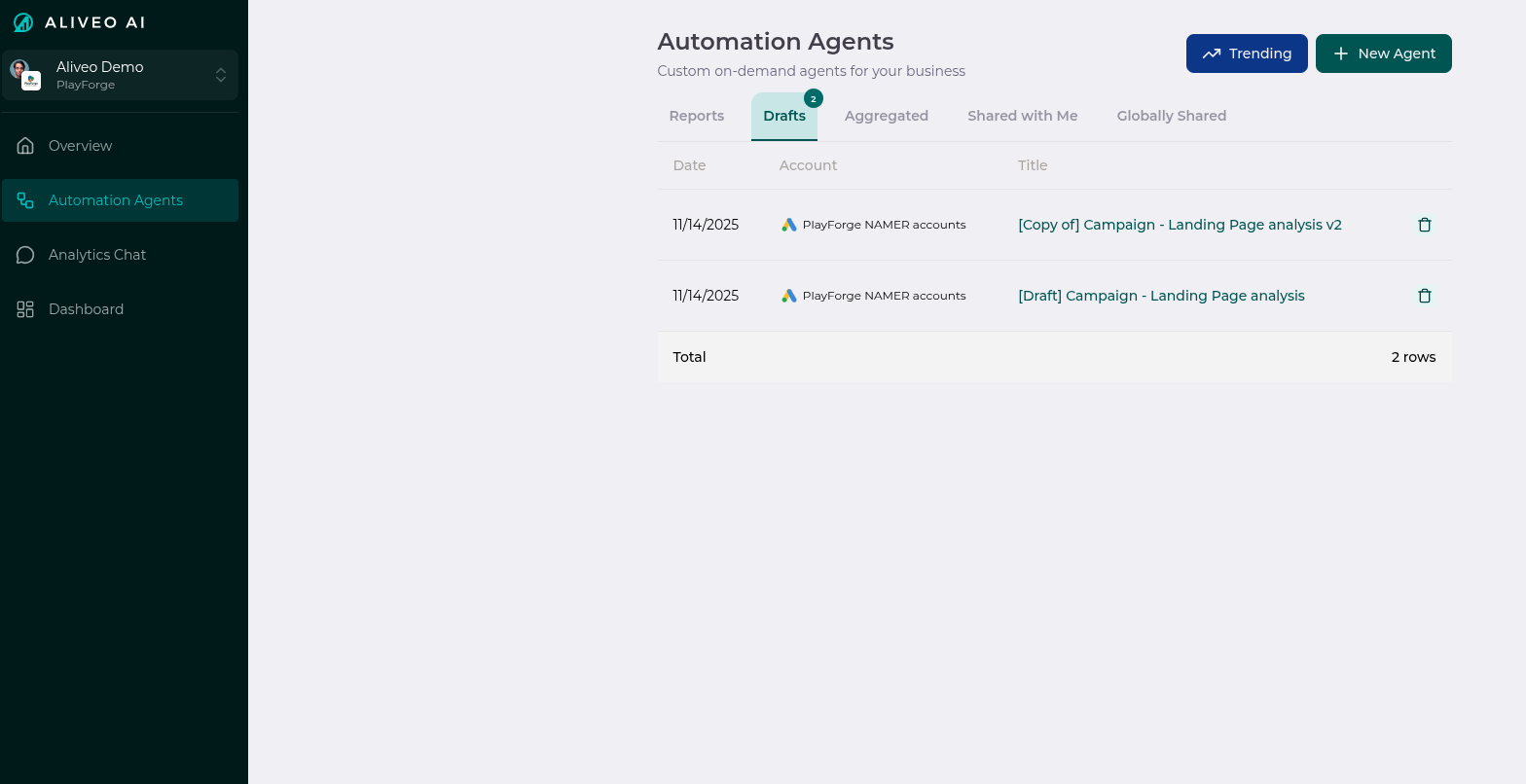
- Unfinished agents automatically become drafts.
- Access the Drafts tab in the Automation Agents page to view all your drafts.
- Click on any draft to continue editing and configuring it.
- Drafts let you refine instructions, steps, and scheduling before activation.
💡 Tip: Use drafts to experiment with agent setups before making them live.
2. Managing Agents in Reports Tab
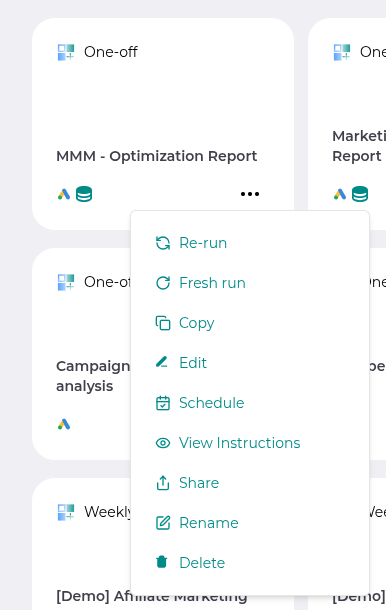
On the Reports tab in Automation Agents, each agent card has a menu (three horizontal dots) with powerful options:
- Re-run: Regenerate the report using the current agent code and the latest data—fastest path to a refreshed report.
- Fresh Re-run: Regenerate both the underlying plan/code and the report. Use this when the template has been improved upstream or you want to pull in the latest logic.
- Copy: Create a deep copy of the agent, including all instructions and steps.
- Schedule: View or edit scheduling preferences (one-off, daily, weekly, monthly on first or any day of month, etc.). See Schedule types.
- View Instructions: See the agent’s context and step-by-step instructions.
- Share: Collaborate by sharing agents (see below).
- Rename: Change the agent’s title as needed.
- Delete: Permanently remove the agent.
⚠️ Note: Deleted agents cannot be recovered.
3. Run Status & Auto-Recovery
When a scheduled run hits an error, Aliveo doesn’t just give up. The system:
- Triggers an automated triage that consults a library of known issues.
- Attempts an auto-fix for common failures (e.g., empty filter results, expected columns missing).
- If the auto-fix succeeds, finalizes the run as Recovered via Fresh Re-run and delivers the report as usual.
- If recovery isn’t possible, the failure is logged with a structured error code so engineers can pick it up.
You’ll see the run’s final status (Success, Recovered, Failed, or Clarification-needed) right on the report card.
4. Scheduling Agents
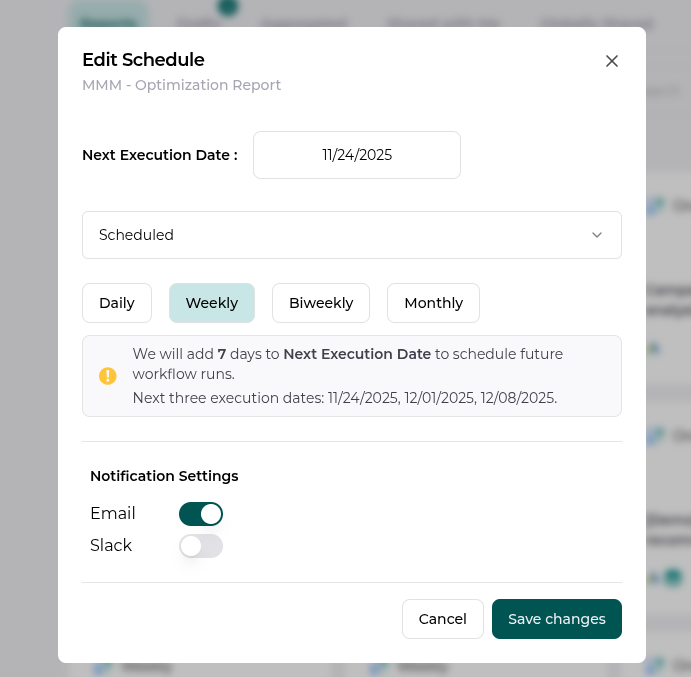
- Set how often your agent should run: one-off, daily, weekly, or monthly (with first-of-month or specific-day-of-month options).
- Edit scheduling preferences anytime from the agent card menu.
- Scheduled agents automatically generate reports and send notifications as configured.
- The schedule preview shows the next three upcoming execution dates so you can confirm before saving.
5. Collaboration Features
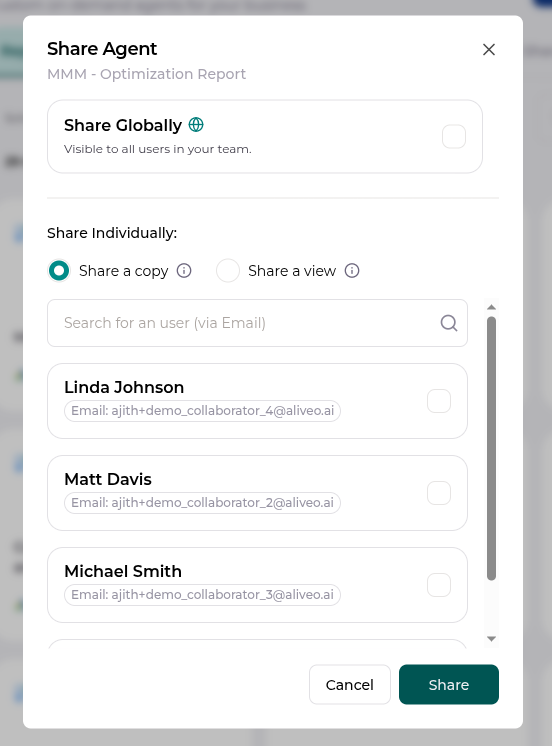
- Share Globally: Make the agent available to all users in your organization. Everyone with access to the workspace can find and run it.
- Share a Copy (via Email): Send a duplicate workflow to a user (recipient must have an Aliveo AI account). They can edit independently—your original is untouched.
- Share a View (via Email): Allow a user to view your workflow as-is (recipient must have an Aliveo AI account). They cannot edit or change it.
When you send emails to recipients outside your organization, those external addresses are automatically BCC’d—internal teammates see each other on To/CC, but external recipients only see themselves.
⚠️ Note: Copies and shared views are independent and do not affect your original agent.
6. Deep-Dive Into a Report
Every report has a Deep-Dive button at the top that opens a Report Chat panel pre-loaded with the run’s accounts, dates, and outputs. Use it for drilldowns (“break this CPA spike down by market”), comparisons against past runs, or what-if questions—without leaving the report.
Each workflow keeps its own Report Chat history; resume any past chat from the history popover in the panel header. Full guide: Report Chat.
7. Notifications & Delivery
Reports can be delivered as:
- Email — with the headline summary and a link back to Aliveo for the full run.
- Slack — posted into a chosen channel by
@Aliveo AI(see Slack Integration). - Both — for high-visibility weekly or monthly reviews.
Email priority is automatically adjusted: low-priority alerts (chat load failures, transient errors) are de-emphasized, while scheduled report deliveries are sent at normal priority.
Managing your automation agents is simple and flexible!